

The swatch attributes can be used on the category page, product page, and layered navigation. The swatches make the product attributes very attractive on the website and easy to choose for customers. For example, size, color, length, etc. In this blog, we get an idea of how to create a custom visual swatch-type product attribute like a color attribute. The following snippet is a full code example of adding a visual swatch attribute.
<?php

declare(strict_types=1);

namespace Mage2\Demo\Setup\Patch\Data;

use Magento\Eav\Model\Config;
use Magento\Eav\Model\ResourceModel\Entity\Attribute\Option\CollectionFactory;
use Magento\Eav\Setup\EavSetup;
use Magento\Eav\Setup\EavSetupFactory;
use Magento\Framework\Exception\LocalizedException;
use Magento\Framework\Setup\ModuleDataSetupInterface;
use Magento\Framework\Setup\Patch\DataPatchInterface;
use Magento\Catalog\Model\Product;
use Magento\Catalog\Model\Product\Type;
use Magento\Catalog\Model\ResourceModel\Eav\Attribute as EavAttribute;
use Psr\Log\LoggerInterface;

class AddVisualSwatchProductAttribute implements DataPatchInterface
{
    /**
     * @var array
     */
    protected array $colorMap = [
        'Black' => '#000000',
        'Blue' => '#1857f7',
        'Brown' => '#945454',
        'Gray' => '#8f8f8f',
        'Green' => '#53a828',
        'Lavender' => '#ce64d4',
        'Multi' => '#ffffff',
        'Orange' => '#eb6703',
        'Purple' => '#ef3dff',
        'Red' => '#ff0000',
        'White' => '#ffffff',
        'Yellow' => '#ffd500',
    ];

    /**
     * @var array
     */
    protected array $optionCollection = [];
    /**
     * @var ModuleDataSetupInterface
     */
    private ModuleDataSetupInterface $moduleDataSetup;
    /**
     * @var EavSetupFactory
     */
    private EavSetupFactory $eavSetupFactory;
    /**
     * @var CollectionFactory
     */
    private CollectionFactory $attrOptionCollectionFactory;
    /**
     * @var Config
     */
    private Config $eavConfig;
    /**
     * @var LoggerInterface
     */
    private LoggerInterface $logger;

    /**
     * @param ModuleDataSetupInterface $moduleDataSetup
     * @param EavSetupFactory $eavSetupFactory
     * @param CollectionFactory $attrOptionCollectionFactory
     * @param Config $eavConfig
     * @param LoggerInterface $logger
     */
    public function __construct(
        ModuleDataSetupInterface $moduleDataSetup,
        EavSetupFactory          $eavSetupFactory,
        CollectionFactory        $attrOptionCollectionFactory,
        Config                   $eavConfig,
        LoggerInterface          $logger
    ) {
        $this->moduleDataSetup = $moduleDataSetup;
        $this->eavSetupFactory = $eavSetupFactory;
        $this->attrOptionCollectionFactory = $attrOptionCollectionFactory;
        $this->eavConfig = $eavConfig;
        $this->logger = $logger;
    }

    /**
     * @return array
     */
    public static function getDependencies()
    {
        return [];
    }

    /**
     * @return AddVisualSwatchProductAttribute|void
     */
    public function apply()
    {
        try {
            $productTypes = implode(',', [Type::TYPE_SIMPLE, Type::TYPE_VIRTUAL]);

            /** @var EavSetup $eavSetup */
            $eavSetup = $this->eavSetupFactory->create(['setup' => $this->moduleDataSetup]);

            $eavSetup->addAttribute(Product::ENTITY, 'sample_visual_swatch', [
                    'type' => 'int',
                    'label' => 'Sample Visual Swatch',
                    'input' => 'select',
                    'required' => false,
                    'user_defined' => true,
                    'searchable' => true,
                    'filterable' => true,
                    'comparable' => true,
                    'visible_in_advanced_search' => true,
                    'apply_to' => $productTypes,
                    'is_used_in_grid' => true,
                    'is_visible_in_grid' => false,
                    'option' => [
                        'values' => [
                            'Black',
                            'Blue',
                            'Brown',
                            'Gray',
                            'Green',
                            'Lavender',
                            'Multi',
                            'Orange',
                            'Purple',
                            'Red',
                            'White',
                            'Yellow'
                        ]
                    ]
                ]
            );

            $this->eavConfig->clear();
            $this->convertAttributeToSwatches();

        } catch (\Exception $e) {
            $this->logger->critical($e);

        }
    }

    /**
     * @return void
     * @throws LocalizedException
     */
    public function convertAttributeToSwatches()
    {
        $attribute = $this->eavConfig->getAttribute('catalog_product', 'sample_visual_swatch');
        if (!$attribute) {
            return;
        }

        $attributeData['option'] = $this->addExistingOptions($attribute);
        $attributeData['frontend_input'] = 'select';
        $attributeData['swatch_input_type'] = 'visual';
        $attributeData['update_product_preview_image'] = 1;
        $attributeData['use_product_image_for_swatch'] = 0;
        $attributeData['optionvisual'] = $this->getOptionSwatch($attributeData);
        $attributeData['defaultvisual'] = $this->getOptionDefaultVisual($attributeData);
        $attributeData['swatchvisual'] = $this->getOptionSwatchVisual($attributeData);
        $this->logger->log(100, print_r($attributeData, true));
        $attribute->addData($attributeData);
        $attribute->save();
    }

    /**
     * @param EavAttribute $attribute
     * @return array
     */
    private function addExistingOptions(eavAttribute $attribute): array
    {
        $options = [];
        $attributeId = $attribute->getId();
        if ($attributeId) {
            $this->loadOptionCollection($attributeId);
            /** @var \Magento\Eav\Model\Entity\Attribute\Option $option */
            foreach ($this->optionCollection[$attributeId] as $option) {
                $options[$option->getId()] = $option->getValue();
            }
        }
        return $options;
    }

    /**
     * @param int $attributeId
     * @return void
     */
    private function loadOptionCollection($attributeId)
    {
        if (empty($this->optionCollection[$attributeId])) {
            $this->optionCollection[$attributeId] = $this->attrOptionCollectionFactory->create()
                ->setAttributeFilter($attributeId)
                ->setPositionOrder('asc', true)
                ->load();
        }
    }

    /**
     * @param array $attributeData
     * @return array
     */
    protected function getOptionSwatch(array $attributeData): array
    {
        $optionSwatch = ['order' => [], 'value' => [], 'delete' => []];
        $i = 0;
        foreach ($attributeData['option'] as $optionKey => $optionValue) {
            $optionSwatch['delete'][$optionKey] = '';
            $optionSwatch['order'][$optionKey] = (string)$i++;
            $optionSwatch['value'][$optionKey] = [$optionValue, ''];
        }
        return $optionSwatch;
    }

    /**
     * @param array $attributeData
     * @return array
     */
    private function getOptionDefaultVisual(array $attributeData): array
    {
        $optionSwatch = $this->getOptionSwatchVisual($attributeData);
        return [array_keys($optionSwatch['value'])[0]];
    }

    /**
     * @param array $attributeData
     * @return array
     */
    private function getOptionSwatchVisual(array $attributeData): array
    {
        $optionSwatch = ['value' => []];
        foreach ($attributeData['option'] as $optionKey => $optionValue) {
            if (substr($optionValue, 0, 1) == '#' && strlen($optionValue) == 7) {
                $optionSwatch['value'][$optionKey] = $optionValue;
            } else if (!empty($this->colorMap[$optionValue])) {
                $optionSwatch['value'][$optionKey] = $this->colorMap[$optionValue];
            } else {
                $optionSwatch['value'][$optionKey] = $this->colorMap['White'];
            }
        }
        return $optionSwatch;
    }

    /**
     * @return array
     */
    public function getAliases()
    {
        return [];
    }
}
After that, we need to run the following command in the command line interface:
bin/magento setup:upgrade
This command would add a custom visual swatch in the product attributes grid and you can see the following output:
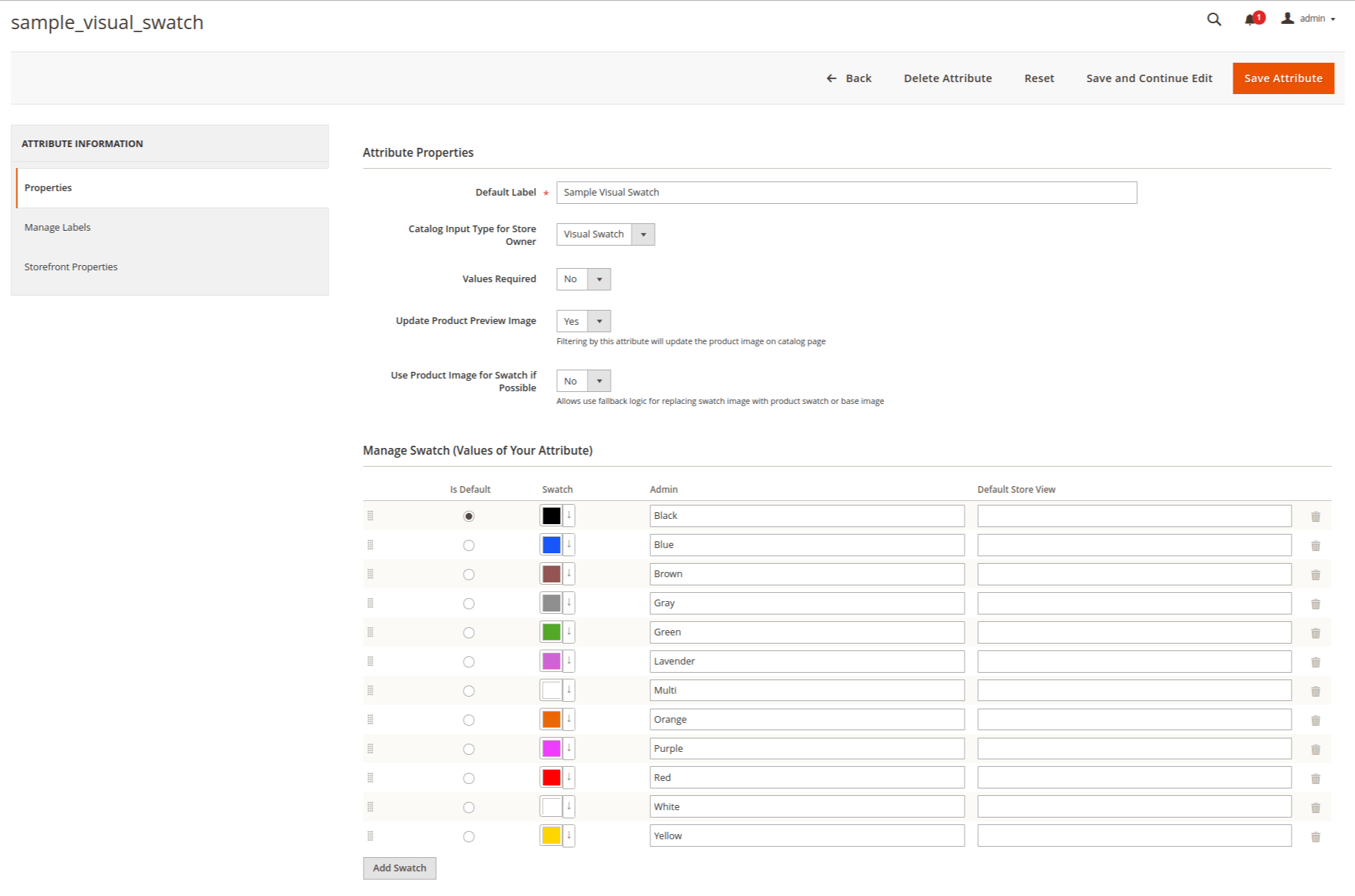
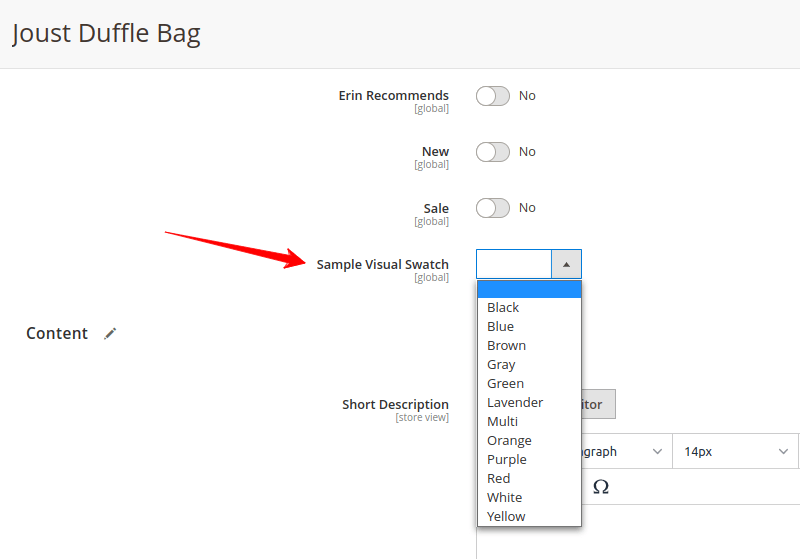
You need to add sample_visual_swatch attribute to the specific attribute set from the admin panel. Admin > Stores > Attributes > Attribute Set. And then the visual swatch product attribute may look like the following:
We hope this blog may understandable and useful to you. You can email us at mage2developer@gmail.com if we missed anything or want to add any suggestions. We will respond to you as soon as possible. Happy to help 🙂
